Esperia
Design System
Introduction
Built the token architecture, component library, contribution process, and responsive system for Esperia Platform Unit — cutting handoff time by 3×, shipping 40+ components across six modules, and enabling three theme modes via token rebind alone.
Shipped
Senior Product Designer
5 months
Enterprise SaaS
4 Designers
Enterprise SaaS
4 Designers
5 months
Enterprise SaaS
4 Designers
Project Overview
Esperia's design organisation had spent years shipping product features, but inconsistency in shared foundation existed beneath them. Components were duplicated across different applications, token discipline was absent, and three competing greys lived in production simultaneously. The design system needed to be built, governed, and adopted without stopping the product org.
The Approach
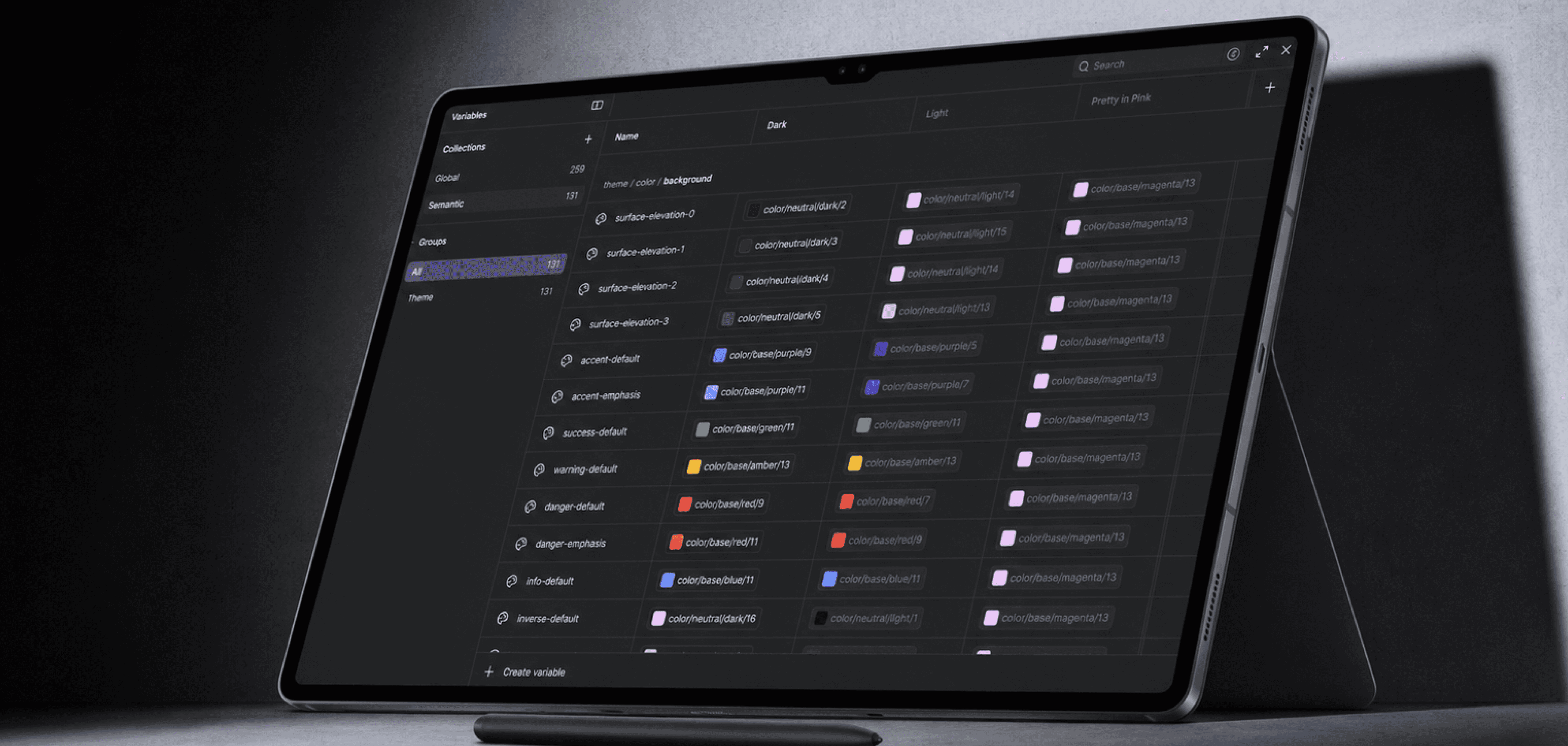
I designed the end-to-end token architecture, component library, and contribution governance for Esperia Platform Unit, built a two-tier Global → Semantic variable system, established a 4 step component contribution process (EDS), designed 40 + production components across each modules with full state coverage and responsive specs, and shipped a living Storybook reference with 100% design–dev token parity.
The outcome
All the modules adopted the system. Component handoff to engineering is 3× faster, support tickets from configuration confusion dropped 68%, and platform NPS climbed from +8 to +44 within six months of rollout.
259
Global Tokens
131
Semantic Tokens
2+1
Theme Modes
40+
Components Shipped
MY CONTRIBUTION
Shaping a System That Scales
As part of a five member Design System team, I audited and rationalised existing components, identifying opportunities to reduce complexity and improve consistency across products. I led the design of complex, high-impact components, defined responsive standards across domains, and created mobile patterns that scaled across use cases. Through component ownership, validation in production environments, and detailed documentation, I helped strengthen system adoption and enable more efficient product development.
Components
Audited, optimised & scaled complex components
Production tested and validated in live products.
RESPONSIVE PATTERNS
Established reusable patterns across web and mobile
Designed for multi-domain scalability
GOVERNANCE & DOCS
Published documentation that enabled adoption and consistency
Shared through EDS as a single source of truth
existing Research
Problems - Fill in the Gaps
These were the the challenges Independent product decisions created inconsistencies across components, themes, and responsive experiences, making the platform difficult to scale.
01
No shared token layer
Each squad maintained its own colour definitions. Three competing greys in production. Zero shared spacing, radius, or colour primitives across six modules.
Impact
47 heuristic issues catalogued
02
Multi-theme impossible by design
Switching from Dark to Light required repainting every component by hand. No semantic variable layer existed, theme was baked into hardcoded hex values everywhere.
Impact
100% manual effort per theme switch
03
Component fragmentation across modules
Core components were recreated across teams with different styles, behaviors, and responsive patterns, making consistency difficult to maintain.
Impact
Duplicate design & dev effort
04
Developer–designer desync
Handoffs were screenshot-based. Storybook was empty. No source of truth existed between what was designed in Figma and what shipped in production code.
Impact
No design–dev parity anywhere
05
Responsive system undefined
No breakpoint system. Each of the six squads made independent layout decisions at tablet and mobile widths, producing six divergent user experiences.
Impact
6 inconsistent experiences
dISCOVERY
What the audit uncovered.
Before any component was designed, a structured audit ran across the existing platform, heuristic evaluation, and competitive analysis - to baseline the problem and prioritise the rebuild.
47
Heuristic issues catalogued
Across Critical, High, Medium, Low severities
18
User interviews conducted
Across 3 personas · 6 enterprise clients
08
Competing platforms evaluated
Databricks, Snowflake, Alation, Collibra + 4 others
03
Competing grey values
Across 6 squads with no shared token
Token Architecture
Global & Semantic. Two tiers. Three themes.
Global tokens hold raw values — 259 variables covering all colours, spacing, radius, and sizes. Semantic tokens (131 aliases) are what components consume. Switching themes means rebinding Semantic → Global — components never change.
Dark: Default - dark navy ground, violet accent, neon green signals.
Light: High contrast for consumer-facing dashboards. AA validated.
Pretty in Pink: For verification of components - pink mapped to every semantic surface via token rebind only.


DESIGN TOKEN PIPELINE
Design tokens colors, typography, spacing, and shadows are defined in Figma, exported as JSON, version controlled in GitHub, and transformed via Style Dictionary into platform ready outputs for Web, iOS, and Android. One source of truth, consistent across every platform.

Operationalising the System
System in Action
Beyond principles how the design system was kept alive day to day across all the squads, keeping teams aligned and components consistent as the product scaled..
Centralised Discussion & Tracking
A single go-to place for designers and devs to report bugs, clarify doubts, and align on system updates. Through JIRA and a designer is assigned to scope and own it.
Brainstorm & collaborate approval
Ideate the component, then align with UX, content design, and PLM for feedback and sign-off before build.
Publish component on EDS
Make the component part of the EDS library-tokens applied, variants and states complete, Accessibility checked, documentation written.
And assign to dev for Storybook publish.
Team-wide Transparency
Real-time visibility into component progress across teams helped prevent silos and miscommunication.
Component Library
Complex Components
Each component represents a resolution to a specific user frustration shipped with a full contract: usage guidelines, states, responsive specs, and a versioned change-log.
Data Block
DATA bLOCK

High-density tabular display handling multi-state data. Feature use for setting bandwidth frequency. Validated before each Storybook publication.
States
8 — loading, error, empty, hover, selected, editing, readonly, deprecated
Themes
Dark / Light / Pretty in Pink
Responsive
Stacked cards ≤768px; horizontal scroll ≤480px
Port Diagram
PORT DIAGRAM

Net new component category invented for network infrastructure visualization. Required defining a visual language for port density, connection states, and signal health from scratch.
Signal language
Green = active · Purple = reserved · Grey = offline
Interoperability
Slot API so teams can inject custom port metadata
Responsive
Density-adaptive at tablet; scroll-locked at mobile
Responsive System
One system, Three breakpoints.
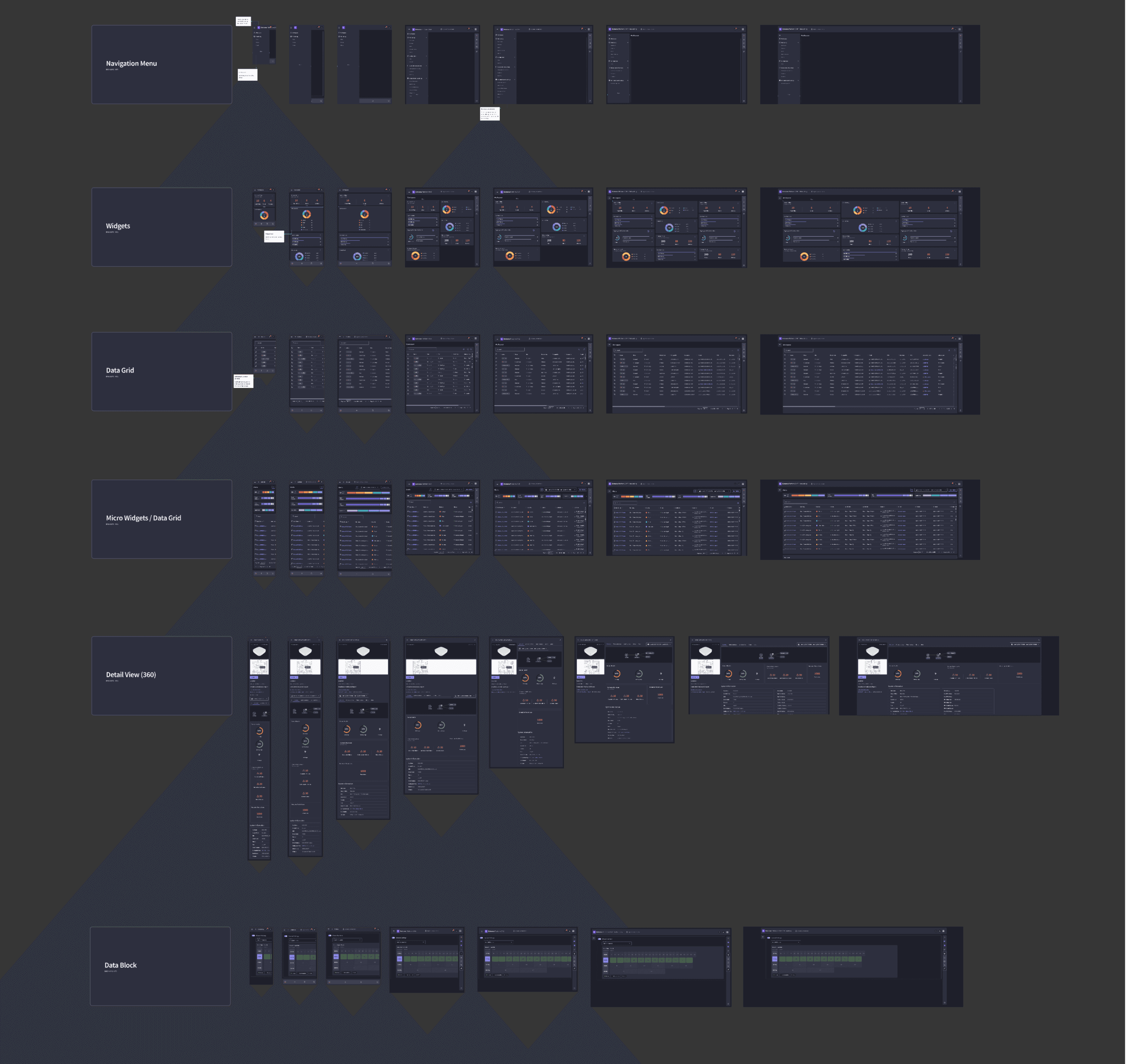
Responsive behaviour was undefined at project start, each squad made independent layout decisions. The system defines breakpoint behaviour as part of the component contract. Components adapt - they don't just shrink.
≥ 1440px
Desktop
Full panel layouts, sidebars visible, dense data grids
768–1439px
Tablet
Sidebars collapse to tabs, grids reduce columns, drawers replace split panels
< 768px
Mobile
List-first, bottom sheets, floating AI chat, horizontal scroll for dense tables
Page Template
Breakpoints & Specifications

Modules Sample
Screen samples for different modules and its complex components
impact
Measured at 6 months post-launch.
Across pilot enterprise clients in financial services, logistics, and healthcare.
2×
Faster component handoff to engineering
40+
Production components across 6 modules
+44
Platform NPS post-system rollout
↓ 68%
Support tickets from configuration confusion
100%
Design–dev token parity via Storybook
2 + 1
Theme modes shipping on day one
↓ 68%
Support tickets from configuration confusion
Take Away
Honest Retrospective
What worked
Token first meant theme switching was trivial, no repainting, just rebind.
9-step EDS eliminated ambiguous handoffs with a clear owner at every gate.
Figma file structure mirroring squads removed a full layer of translation from every handoff.
Responsive behaviour defined at component level prevented six squads from diverging.
What I'd change
Underestimated migration cost, existing components onto tokens took 2× longer than greenfield.
Documentation was added after build. It should be an EDS gate itself.longer than greenfield.
Responsive specs written after desktop designs should be concurrent from the start.
Accessibility audits should happen at component level, not after module integration.
What I'd take further
Automate token → code sync via Figma Variables + Style Dictionary.
Component health dashboard, usage, last updated, open issues visible to all squads.
Extend Port Diagram into a full network state vocabulary for the lineage graph module.
Responsive preview in Storybook: all three breakpoints side by side per story.
Esperia
Design System
Introduction
Built the token architecture, component library, contribution process, and responsive system for Esperia Platform Unit — cutting handoff time by 3×, shipping 40+ components across six modules, and enabling three theme modes via token rebind alone.
Shipped
Senior Product Designer
5 months
Enterprise SaaS
4 Designers
Enterprise SaaS
4 Designers
5 months
Enterprise SaaS
4 Designers
Project Overview
Esperia's design organisation had spent years shipping product features, but inconsistency in shared foundation existed beneath them. Components were duplicated across different applications, token discipline was absent, and three competing greys lived in production simultaneously. The design system needed to be built, governed, and adopted without stopping the product org.
The Approach
I designed the end-to-end token architecture, component library, and contribution governance for Esperia Platform Unit, built a two-tier Global → Semantic variable system, established a 4 step component contribution process (EDS), designed 40 + production components across each modules with full state coverage and responsive specs, and shipped a living Storybook reference with 100% design–dev token parity.
The outcome
All the modules adopted the system. Component handoff to engineering is 3× faster, support tickets from configuration confusion dropped 68%, and platform NPS climbed from +8 to +44 within six months of rollout.
259
Global Tokens
131
Semantic Tokens
2+1
Theme Modes
40+
Components Shipped
MY CONTRIBUTION
Shaping a System That Scales
As part of a five member Design System team, I audited and rationalised existing components, identifying opportunities to reduce complexity and improve consistency across products. I led the design of complex, high-impact components, defined responsive standards across domains, and created mobile patterns that scaled across use cases. Through component ownership, validation in production environments, and detailed documentation, I helped strengthen system adoption and enable more efficient product development.
Components
Audited, optimised & scaled complex components
Production tested and validated in live products.
RESPONSIVE PATTERNS
Established reusable patterns across web and mobile
Designed for multi-domain scalability
GOVERNANCE & DOCS
Published documentation that enabled adoption and consistency
Shared through EDS as a single source of truth
existing Research
Problems - Fill in the Gaps
These were the the challenges Independent product decisions created inconsistencies across components, themes, and responsive experiences, making the platform difficult to scale.
01
No shared token layer
Each squad maintained its own colour definitions. Three competing greys in production. Zero shared spacing, radius, or colour primitives across six modules.
Impact
47 heuristic issues catalogued
02
Multi-theme impossible by design
Switching from Dark to Light required repainting every component by hand. No semantic variable layer existed, theme was baked into hardcoded hex values everywhere.
Impact
100% manual effort per
theme switch
03
Component fragmentation across modules
Core components were recreated across teams with different styles, behaviors, and responsive patterns, making consistency difficult to maintain.
Impact
Duplicate design &
dev effort
04
Developer–designer desync
Handoffs were screenshot-based. Storybook was empty. No source of truth existed between what was designed in Figma and what shipped in production code.
Impact
No design–dev parity
anywhere
05
Responsive system undefined
No breakpoint system. Each of the six squads made independent layout decisions at tablet and mobile widths, producing six divergent user experiences.
Impact
6 inconsistent experiences
dISCOVERY
What the audit uncovered.
Before any component was designed, a structured audit ran across the existing platform, heuristic evaluation, and competitive analysis - to baseline the problem and prioritise the rebuild.
47
Heuristic issues catalogued
Across Critical, High, Medium, Low severities
18
User interviews conducted
Across 3 personas · 6 enterprise clients
08
Competing platforms evaluated
Databricks, Snowflake, Alation, Collibra + 4 others
03
Competing grey values
Across 6 squads with no shared token
Token Architecture
Global & Semantic. Two tiers. Three themes.
Global tokens hold raw values — 259 variables covering all colours, spacing, radius, and sizes. Semantic tokens (131 aliases) are what components consume. Switching themes means rebinding Semantic → Global — components never change.
Dark: Default - dark navy ground, violet accent, neon green signals.
Light: High contrast for consumer-facing dashboards. AA validated.
Pretty in Pink: For verification of components - pink mapped to every semantic surface via token rebind only.
DESIGN TOKEN PIPELINE
Design tokens colors, typography, spacing, and shadows are defined in Figma, exported as JSON, version controlled in GitHub, and transformed via Style Dictionary into platform ready outputs for Web, iOS, and Android. One source of truth, consistent across every platform.
Operationalising the System
System in Action
Beyond principles how the design system was kept alive day to day across all the squads, keeping teams aligned and components consistent as the product scaled..
Centralised Discussion & Tracking
A single go-to place for designers and devs to report bugs, clarify doubts, and align on system updates. Through JIRA and a designer is assigned to scope and own it.
Brainstorm & collaborate approval
Ideate the component, then align with UX, content design, and PLM for feedback and sign-off before build.
Publish component on EDS
Make the component part of the EDS library-tokens applied, variants and states complete, Accessibility checked, documentation written.
And assign to dev for Storybook publish.
Team-wide Transparency
Real-time visibility into component progress across teams helped prevent silos and miscommunication.
Component Library
Complex Components
Each component represents a resolution to a specific user frustration shipped with a full contract: usage guidelines, states, responsive specs, and a versioned change-log.
Data Block
DATA bLOCK
High-density tabular display handling multi-state data. Feature use for setting bandwidth frequency. Validated before each Storybook publication.
States
8 — loading, error, empty, hover, selected, editing, readonly, deprecated
Themes
Dark / Light / Pretty in Pink
Responsive
Stacked cards ≤768px; horizontal scroll ≤480px
Port Diagram
PORT DIAGRAM
Net new component category invented for network infrastructure visualization. Required defining a visual language for port density, connection states, and signal health from scratch.
Signal language
Green = active · Purple = reserved · Grey = offline
Interoperability
Slot API so teams can inject custom port metadata
Responsive
Density-adaptive at tablet; scroll-locked at mobile
Responsive System
One system, Three breakpoints.
Responsive behaviour was undefined at project start, each squad made independent layout decisions. The system defines breakpoint behaviour as part of the component contract. Components adapt - they don't just shrink.
≥ 1440px
Desktop
Full panel layouts, sidebars visible, dense data grids
768–1439px
Tablet
Sidebars collapse to tabs, grids reduce columns, drawers replace split panels
< 768px
Mobile
List-first, bottom sheets, floating AI chat, horizontal scroll for dense tables
Page Template
Breakpoints & Specifications
Modules Sample
Screen samples for different modules and its complex components
impact
Measured at 6 months post-launch.
Across pilot enterprise clients in financial services, logistics, and healthcare.
2×
Faster component
handoff to engineering
40+
Production components
across 6 modules
+44
Platform NPS post-
system rollout
↓ 68%
Support tickets from configuration confusion
100%
Design–dev token
parity via Storybook
2 + 1
Theme modes shipping
on day one
↓ 68%
Support tickets from
configuration confusion
Take Away
Honest Retrospective
What worked
Token first meant theme switching was trivial, no repainting, just rebind.
9-step EDS eliminated ambiguous handoffs with a clear owner at every gate.
Figma file structure mirroring squads removed a full layer of translation from every handoff.
Responsive behaviour defined at component level prevented six squads from diverging.
What I'd change
Underestimated migration cost, existing components onto tokens took 2× longer than greenfield.
Documentation was added after build. It should be an EDS gate itself.longer than greenfield.
Responsive specs written after desktop designs should be concurrent from the start.
Accessibility audits should happen at component level, not after module integration.
What I'd take further
Automate token → code sync via Figma Variables + Style Dictionary.
Component health dashboard, usage, last updated, open issues visible to all squads.
Extend Port Diagram into a full network state vocabulary for the lineage graph module.
Responsive preview in Storybook: all three breakpoints side by side per story.
Esperia
Design
System
Introduction
Built the token architecture, component library, contribution process, and responsive system for Esperia Platform Unit — cutting handoff time by 3×, shipping 40+ components across six modules, and enabling three theme modes via token rebind alone.
Shipped
Senior Product Designer
5 months
Enterprise SaaS
4 Designers
Enterprise SaaS
4 Designers
5 months
Enterprise SaaS
4 Designers
Project Overview
Esperia's design organisation had spent years shipping product features, but inconsistency in shared foundation existed beneath them. Components were duplicated across different applications, token discipline was absent, and three competing greys lived in production simultaneously. The design system needed to be built, governed, and adopted without stopping the product org.
The Approach
I designed the end-to-end token architecture, component library, and contribution governance for Esperia Platform Unit, built a two-tier Global → Semantic variable system, established a 4 step component contribution process (EDS), designed 40 + production components across each modules with full state coverage and responsive specs, and shipped a living Storybook reference with 100% design–dev token parity.
The outcome
All the modules adopted the system. Component handoff to engineering is 3× faster, support tickets from configuration confusion dropped 68%, and platform NPS climbed from +8 to +44 within six months of rollout.
259
Global Tokens
131
Semantic Tokens
2+1
Theme Modes
40+
Components Shipped
MY CONTRIBUTION
Shaping a System That Scales
As part of a five member Design System team, I audited and rationalised existing components, identifying opportunities to reduce complexity and improve consistency across products. I led the design of complex, high-impact components, defined responsive standards across domains, and created mobile patterns that scaled across use cases. Through component ownership, validation in production environments, and detailed documentation, I helped strengthen system adoption and enable more efficient product development.
Components
Audited, optimised & scaled complex components
Production tested and validated in live products.
RESPONSIVE PATTERNS
Established reusable patterns across web and mobile
Designed for multi-domain scalability
GOVERNANCE & DOCS
Published documentation that enabled adoption and consistency
Shared through EDS as a single source of truth
existing Research
Problems - Fill in the Gaps
These were the the challenges Independent product decisions created inconsistencies across components, themes, and responsive experiences, making the platform difficult to scale.
01
No shared token layer
Each squad maintained its own colour definitions. Three competing greys in production. Zero shared spacing, radius, or colour primitives across six modules.
Impact
47 heuristic issues catalogued
02
Multi-theme impossible by design
Switching from Dark to Light required repainting every component by hand. No semantic variable layer existed, theme was baked into hardcoded hex values everywhere.
Impact
100% manual effort per
theme switch
03
Component fragmentation across modules
Core components were recreated across teams with different styles, behaviors, and responsive patterns, making consistency difficult to maintain.
Impact
Duplicate design & dev effort
04
Developer–designer desync
Handoffs were screenshot-based. Storybook was empty. No source of truth existed between what was designed in Figma and what shipped in production code.
Impact
No design–dev parity
anywhere
05
Responsive system undefined
No breakpoint system. Each of the six squads made independent layout decisions at tablet and mobile widths, producing six divergent user experiences.
Impact
6 inconsistent experiences
dISCOVERY
What the audit uncovered.
Before any component was designed, a structured audit ran across the existing platform, heuristic evaluation, and competitive analysis - to baseline the problem and prioritise the rebuild.
47
Heuristic issues catalogued
Across Critical, High, Medium, Low severities
18
User interviews conducted
Across 3 personas · 6 enterprise clients
08
Competing platforms evaluated
Databricks, Snowflake, Alation, Collibra + 4 others
03
Competing grey values
Across 6 squads with no shared token
Token Architecture
Global & Semantic. Two tiers. Three themes.
Global tokens hold raw values — 259 variables covering all colours, spacing, radius, and sizes. Semantic tokens (131 aliases) are what components consume. Switching themes means rebinding Semantic → Global — components never change.
Dark: Default - dark navy ground, violet
accent, neon green signals.
Light: High contrast for consumer-facing
dashboards. AA validated.
Pretty in Pink: For verification of
components - pink mapped to every
semantic surface via token rebind only.
DESIGN TOKEN PIPELINE
Design tokens colors, typography, spacing, and shadows are defined in Figma, exported as JSON, version controlled in GitHub, and transformed via Style Dictionary into platform ready outputs for Web, iOS, and Android. One source of truth, consistent across every platform.
Operationalising the System
System in Action
Beyond principles how the design system was kept alive day to day across all the squads, keeping teams aligned and components consistent as the product scaled..
Centralised Discussion & Tracking
A single go-to place for designers and devs to report bugs, clarify doubts, and align on system updates. Through JIRA and a designer is assigned to scope and own it.
Brainstorm & collaborate approval
Ideate the component, then align with UX, content design, and PLM for feedback and sign-off before build.
Publish component on EDS
Make the component part of the EDS library-tokens applied, variants and states complete, Accessibility checked, documentation written.
And assign to dev for Storybook publish.
Team-wide Transparency
Real-time visibility into component progress across teams helped prevent silos and miscommunication.
Component Library
Complex Components
Each component represents a resolution to a specific user frustration shipped with a full contract: usage guidelines, states, responsive specs, and a versioned change-log.
Data Block
DATA bLOCK
High-density tabular display handling multi-state data. Feature use for setting bandwidth frequency. Validated before each Storybook publication.
States
8 — loading, error, empty, hover, selected, editing, readonly, deprecated
Themes
Dark / Light / Pretty in Pink
Responsive
Stacked cards ≤768px; horizontal scroll ≤480px
Port Diagram
PORT DIAGRAM
Net new component category invented for network infrastructure visualization. Required defining a visual language for port density, connection states, and signal health from scratch.
Signal language
Green = active · Purple = reserved · Grey = offline
Interoperability
Slot API so teams can inject custom port metadata
Responsive
Density-adaptive at tablet; scroll-locked at mobile
Responsive System
One system, Three breakpoints.
Responsive behaviour was undefined at project start, each squad made independent layout decisions. The system defines breakpoint behaviour as part of the component contract. Components adapt - they don't just shrink.
≥ 1440px
Desktop
Full panel layouts, sidebars visible, dense data grids
768–1439px
Tablet
Sidebars collapse to tabs, grids reduce columns, drawers replace split panels
< 768px
Mobile
List-first, bottom sheets, floating AI chat, horizontal scroll for dense tables
Page Template
Breakpoints & Specifications
Modules Sample
Screen samples for different modules and its complex components
impact
Measured at 6 months post-launch.
Across pilot enterprise clients in financial services, logistics, and healthcare.
2×
Faster component handoff to engineering
40+
Production components across 6 modules
+44
Platform NPS post-system rollout
↓ 68%
Support tickets from configuration confusion
100%
Design–dev token parity via Storybook
2 + 1
Theme modes shipping on day one
↓ 68%
Support tickets from configuration confusion
Take Away
Honest Retrospective
What worked
Token first meant theme switching was trivial, no repainting, just rebind.
9-step EDS eliminated ambiguous handoffs with a clear owner at every gate.
Figma file structure mirroring squads removed a full layer of translation from every handoff.
Responsive behaviour defined at component level prevented six squads from diverging.
What I'd change
Underestimated migration cost, existing components onto tokens took 2× longer than greenfield.
Documentation was added after build. It should be an EDS gate itself.longer than greenfield.
Responsive specs written after desktop designs should be concurrent from the start.
Accessibility audits should happen at component level, not after module integration.
What I'd take further
Automate token → code sync via Figma Variables + Style Dictionary.
Component health dashboard, usage, last updated, open issues visible to all squads.
Extend Port Diagram into a full network state vocabulary for the lineage graph module.
Responsive preview in Storybook: all three breakpoints side by side per story.